聊天讨论 Grsai Sora2 APi3 个功能接口(生成视频 + 创建角色 + 原视频创建角色)调试教程!新人福利接住

通知!Sora2 最近调整了一波规则,需要绑定手机验证,GrsAi 已经完全解决了该问题,提高了视频成功率!
Sora2 Api文档看不懂?到底怎么调用啊?可以上传真人创建角色吗?3 个不同的 api 都有什么用?怎么收费?
本文将详细介绍 GrsAI APi 源头供应商,提供的三个核心视频生成接口的使用方法,帮助开发者快速接入强大的 0.08/条的 Sora 2 视频生成能力。文末也提供了普通用户使用教程!往下看吧。
我们将重点介绍 Sora2 视频接口、上传角色接口和从原视频创建角色接口具体使用方法和限制。
一、Grsai Api接入前准备
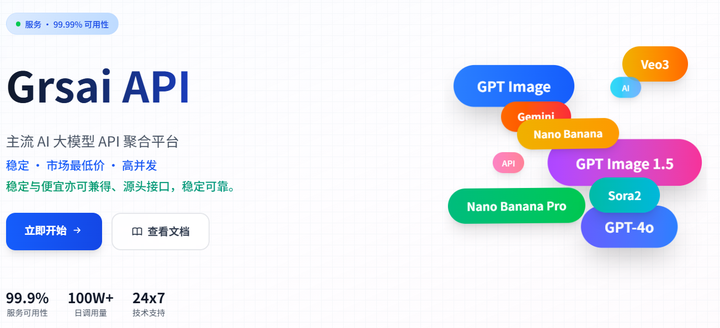
GrsAI(Grsai.com com 域名需要魔法才可访问,没有改成 ai) 是一个专注于聚合海外主流 AI 大模型的 API 服务平台,所有模型均为源头提供非中间商赚差价。所以能以低于官方渠道和市场的价格提供模型调用服务,例如 Sora2——0.08/条,Nano Banana Pro——0.09/张,Nano banana——0.22/张,Gpt image 1.5——0.02/张,Veo3.0/Veo3.1——0.4/条,Gemini2.5,Gemini3.....同时支持高并发请求,适合批量任务,大流量产品。并且失败不扣费积分秒返还,还提供国内直连和海外两种接入节点,方便全球用户低延迟访问。
获取 API Key
API Key 是您调用所有 GrsAI 接口的身份凭证,需要在每次请求的头部(Header)中携带,请妥当保存不要外泄。
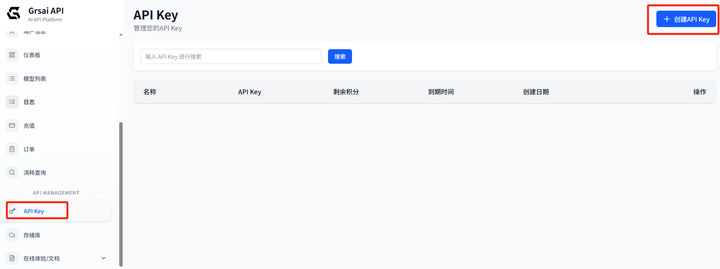
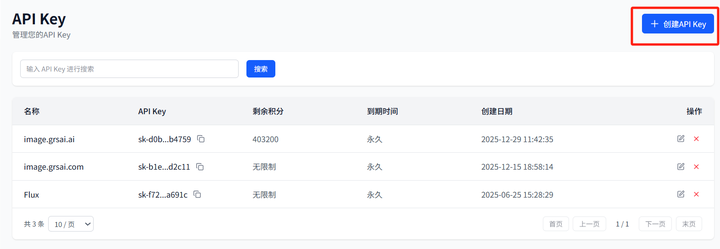
(1)进入 Grsai 控制台:https://grsai.com/zh/dashboard/api-keys(com 需要魔法,没有改成 ai)
(2)生成 API Key:点击 “创建” 按钮,为密钥命名后还可以限制额度,生成后复制使用。
配置请求头部
HTTP 请求的 Header 中按如下格式添加信息:
{
  "Content-Type": "application/json",
  "Authorization": "Bearer apikey"
}
请将 替换为您在控制台实际获取的密钥字符串。
二、Grsai Sora 2 APi 文档详解
1.Sora2 视频生成接
接口基本信息
接口路径: /v1/video/sora-video
请求方式: POST
-
服务地址:
核心功能
Sora2 视频接口可以根据文本提示词(prompt)或参考图片生成高质量视频,0 可以通过此接口:
- 纯文本生成视频
- 图片 + 文本组合生成视频
- 提示词 @ 角色 id 引用角色视频创作
- remix 制作视频续作
- 生成指定比例和时长的视频
remix 二创
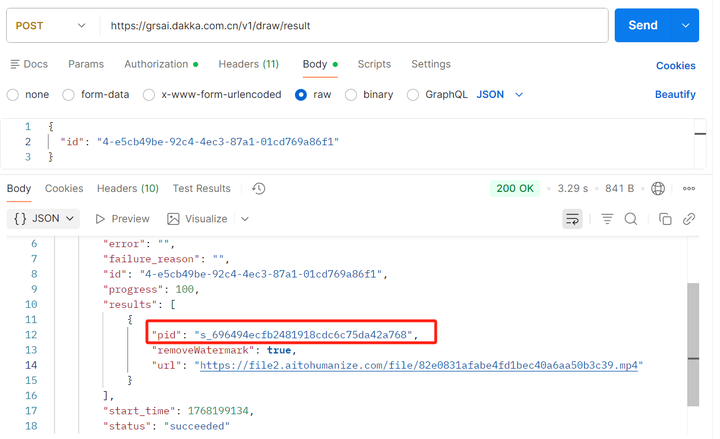
Remix(重混/重制)允许你基于一段已有 Sora 生成的视频(需要 Pid),输入新提示词(prompt)进行修改或延续,而不从零重新生成整个视频。
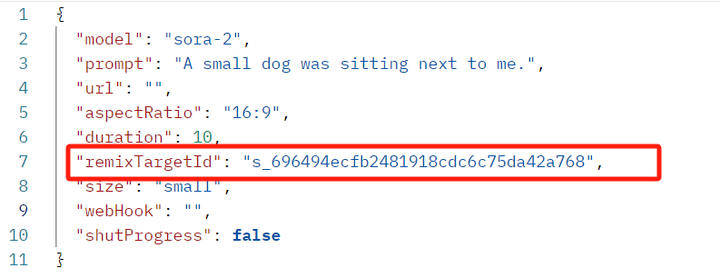
核心参数是 remixTargetId ,参考 results 的 pid 值: s_xxxxxxxxx
添加 remixTargetId 参数,填入原始视频的 ID
请求参数详解
必填参数:
{
  "model": "sora-2",
  "prompt": "提示词" #引用角色在这里@id}
可选参数:
- url: 参考图片 URL 或 Base64 编码(图片转视频功能)
- aspectRatio: 视频比例,支持"9:16"(竖屏)和"16:9"(横屏),默认 9:16
- duration: 视频时长,可选 10 秒或 15 秒,默认 10 秒
- remixTargetId: 续作视频的 pid,用于制作视频续集
- size: 视频清晰度,"small"或"large",默认 small
注意事项
- 禁止生成真人视频:该接口不支持生成真人视频内容
- 使用角色:如需使用角色功能,请使用独立的角色上传接口,然后在提示词中用 @ 角色 id 格式引用
响应处理方式
该接口支持三种结果获取方式:
- 流式响应(默认):实时返回生成进度和结果
- Webhook 回调:设置 webHook 参数,系统将通过 POST 请求回调您的服务器
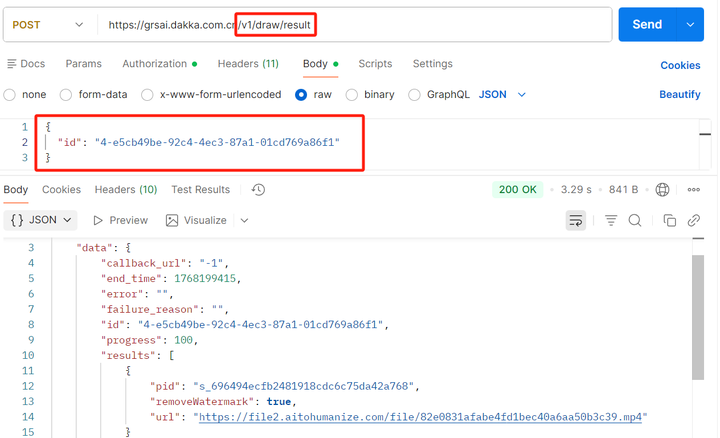
- 轮询方式:设置 webHook 参数为"-1",立即返回任务 ID,然后使用/v1/draw/result 接口轮询结果
成功响应示例
{
  "id": "f44bcf50-f2d0-4c26-a467-26f2014a771b",
  "results": [{
    "url": "https://example.com/example.mp4",
    "removeWatermark": true,
    "pid": "s_xxxxxxxxxxxxxxx"
  }],
  "progress": 100,
  "status": "succeeded"}
使用示例:生成猫咪视频
// 请求示例const response = await fetch('https://grsai.dakka.com.cn/v1/video/sora-video', {
  method: 'POST',
  headers: {
    'Content-Type': 'application/json',
    'Authorization': 'Bearer apikey'
  },
  body: JSON.stringify({
    "model": "sora-2",
    "prompt": "A cute cartoon cat playing with a ball of yarn on a sunny day",
    "aspectRatio": "16:9",
    "duration": 10,
    "size": "small"
  })});
2.上传角色接口
接口基本信息
- 接口路径: /v1/video/sora-upload-character
- 请求方式: POST
核心功能
上传角色视频素材,用于后续的视频生成中引用。角色功能让您可以在不同视频中保持角色一致性。
重要规则
- 禁止上传真人视频:只能上传卡通、动漫等非真人角色视频
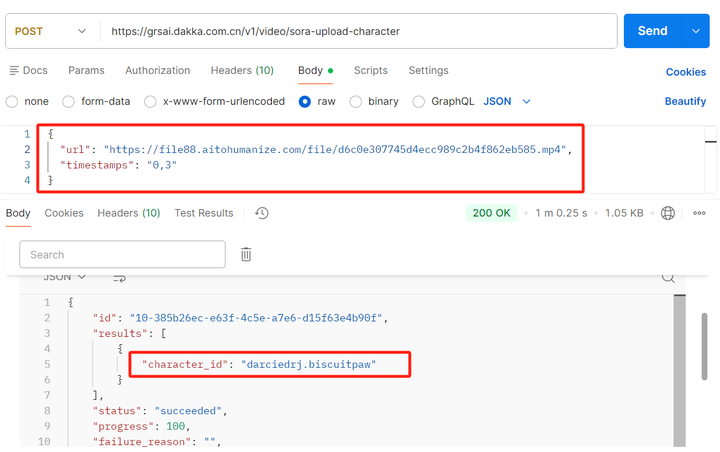
- 视频片段限制:通过 timestamps 参数指定 3 秒以内的有效片段,格式为"开始秒数,结束秒数"
- 一次上传,多次使用:角色上传成功后,可以在所有后续视频生成中重复使用,提示词 @ 角色 id
请求参数
{
  "url": "角色视频URL或Base64",
  "timestamps": "0,3"}
角色引用方法
- 上传成功后,响应中的 character_id 即为角色 ID
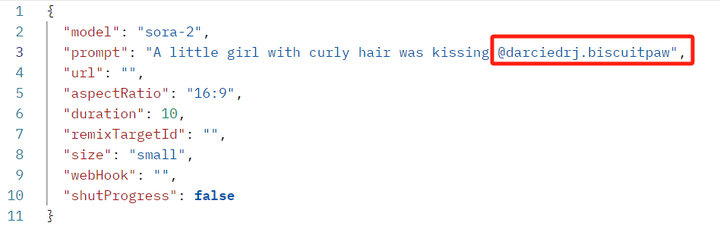
- 在 Sora2 视频生成接口的 prompt 中,使用 @ 角色 id 格式引用角色
- 例如:如果 character_id 为"cat_character",则提示词应为:"A @cat_character jumping in the garden"
使用流程
1.上传角色视频,获取 character_id
2.在生成视频时,在提示词中引用该角色
示例:上传和使用角色
// 1. 上传角色const uploadResponse = await fetch('https://grsai.dakka.com.cn/v1/video/sora-upload-character', {
  method: 'POST',
  headers: {
    'Content-Type': 'application/json',
    'Authorization': 'Bearer apikey'
  },
  body: JSON.stringify({
    "url": "https://example.com/cartoon-cat.mp4",
    "timestamps": "0,3"
  })});const characterData = await uploadResponse.json();const characterId = characterData.results[0].character_id; // 例如:"cartoon_cat_001"// 2. 使用角色生成视频const videoResponse = await fetch('https://grsai.dakka.com.cn/v1/video/sora-video', {
  method: 'POST',
  headers: {
    'Content-Type': 'application/json',
    'Authorization': 'Bearer apikey'
  },
  body: JSON.stringify({
    "model": "sora-2",
    "prompt": `A ${characterId} exploring a magical forest with glowing mushrooms`,
    "aspectRatio": "16:9"
  })});
3.从原视频创建角色接口
接口基本信息
- 接口路径: /v1/video/sora-create-character
- 请求方式: POST
核心功能
从 AI 生成的视频中提取角色,创建可重复使用的角色资源。这是角色创建的第二种方式。
特色功能
- 支持 AI 生成的真人类角色:可以从 AI 生成的视频中创建真人类角色
- 精准提取:通过 timestamps 参数指定视频中的特定片段
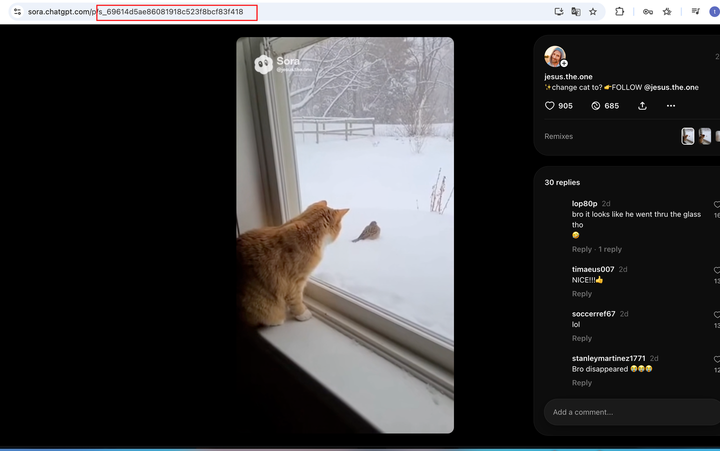
- 与原视频关联:需要提供原视频的 pid(视频 ID)
请求参数
{
  "pid": "s_xxxxxxxxxxxxxxx",
  "timestamps": "0,3"}
使用场景
- 从已生成的视频中(包含 Sora2 平台的视频,拿到 Pid 就可以创建)创建角色
- 创建角色系列视频,保持角色的一致性
- 为热门角色制作衍生内容
工作流程
- 先生成原始视频,获取视频的 pid
- 从原始视频中选择 3 秒内的角色片段
- 调用创建角色接口提取角色
- 获取 character_id 后在后续视频中引用
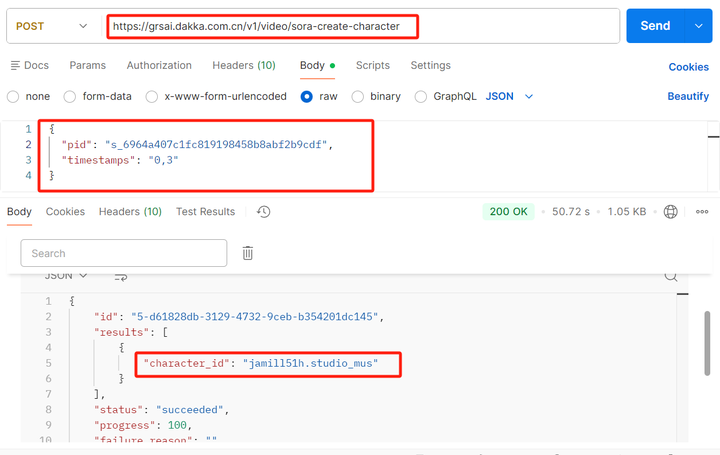
示例:从生成视频中创建角色
// 假设已有一个生成的视频,pid为"s_6964a407c1fc819198458b8abf2b9cdf"// 1. 从视频中创建角色const createCharResponse = await fetch('https://grsai.dakka.com.cn/v1/video/sora-create-character', {
  method: 'POST',
  headers: {
    'Content-Type': 'application/json',
    'Authorization': 'Bearer apikey'
  },
  body: JSON.stringify({
    "pid": "s_6964a407c1fc819198458b8abf2b9cdf",
    "timestamps": "2,5"  // 提取第2-5秒的角色
  })});const newCharacter = await createCharResponse.json();const newCharacterId = newCharacter.results[0].character_id;// 2. 使用新创建的角色生成新视频const newVideoResponse = await fetch('https://grsai.dakka.com.cn/v1/video/sora-video', {
  method: 'POST',
  headers: {
    'Content-Type': 'application/json',
    'Authorization': 'Bearer apikey'
  },
  body: JSON.stringify({
    "model": "sora-2",
    "prompt": `The @${newCharacterId} is now attending a grand feast in a castle`,#@角色id    "aspectRatio": "16:9"
  })});
四、结果获取接口
轮询接口
- 接口路径: /v1/draw/result
- 请求方式: POST
当使用 Webhook 参数为"-1"时,可以使用此接口轮询任务状态:
const resultResponse = await fetch('https://grsai.dakka.com.cn/v1/draw/result', {
  method: 'POST',
  headers: {
    'Content-Type': 'application/json',
    'Authorization': 'Bearer apikey'
  },
  body: JSON.stringify({
    "id": "任务ID"
  })});
五、Sora2 计费标准
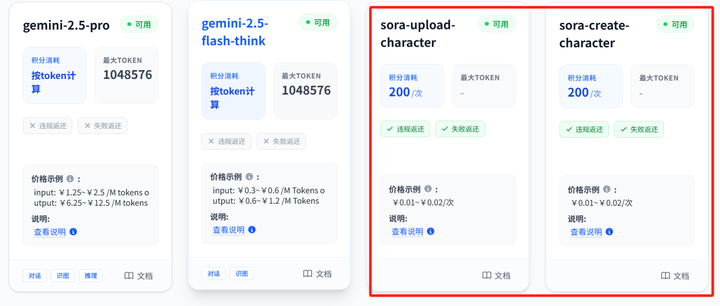
Sora2 生成视频 Api——0.08/条,Sora2 角色上传 Api——0.01/条,Sora2 从原视频上传角色 Api——0.01/条。
六、无需手机验证也能用 Sora2
你是不是也遇到了 Sora2 需要手机验证?到处找人结果都要氪金才能解决?本来 Sora2 一天生成的次数就有限制,这样太不划算了,不如直接用 Grsai 提供的批量生图工具,一条视频 0.08 还没有生成次数限制!
Sora2 批量生图工具:https://image.grsai.com/(com 需要魔法,没有改成 ai)
操作指南:
1.在 GrsAi 控制台:https://grsai.com/zh/dashboard/api-keyscom 需要魔法,没有改成 ai)( 获取 APiKey,有基础额度 5000 可免费用
2.在批量生成工具:https://image.grsai.com/(com 需要魔法,没有改成 ai)右上角绑定 APikey
3.选择 Sora2 模型即可使用
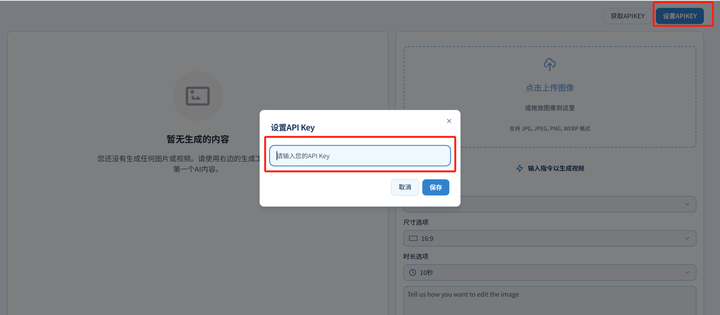
Grsai 批量生成工具可使用 Nano banana pro ,Nano banana,Sora2,Veo 等模型,不限制生成数量,可批量打包下载,适合批量抽卡用户,生成失败不扣费!普通用户直接用 APi 低价使用模型。
注意:生成的内容只会保存 2 小时,需要尽快下载。
总结
在对接 Grsai 的 Sora-2 APi 接口时需要注意!不支持真人生成视频或创建角色,若需使用真人形象,需要先 “视频生成接口” 用提示词生成人物视频,在用 “从原视频创建角色接口” 获取 character_id,最后在 “视频生成接口” 的提示词中 @ 角色 ID 引用角色,角色创建成功后无需重复上传。生成失败秒退款,可放心使用。
通过合理组合使用这三个接口,您可以构建出复杂的视频生成应用,保持角色一致性,创作出系列化的视频内容。